

Digital scales are designed to provide accurate and reliable readings, whether you’re weighing items for a business, at home, or in a medical or industrial setting. However, many users encounter a frustrating problem: their digital scale gives inconsistent readings. Whether the weight fluctuates unexpectedly or appears entirely inaccurate, this can be a significant issue. If you’re facing this problem, don’t worry, you’re not alone, and there are several common causes behind it.
We’ll tell you the typical reasons for inaccurate digital scale readings and provide practical solutions to fix these issues. Whether you’re using a scale for everyday measurements, business use, or something more specialized, you’ll learn how to ensure your scale works accurately every time.
Common Causes of Inconsistent Digital Scale Readings
Inconsistent readings from digital scales are often caused by simple, fixable issues. Understanding these causes can help you troubleshoot and restore accuracy to your device.
Mismatch of Units
One of the most common and overlooked issues when using a digital scale is a mismatch of measurement units. Sometimes, users might be comparing grams to ounces, or other units, which can lead to confusion about the actual weight.
Fix: Always double-check the units before using your scale. Make sure you’re using the correct measurement unit for your needs and ensure that you are comparing like-for-like values. Most digital scales offer a unit toggle button, allowing you to easily switch between grams, ounces, pounds, and kilograms.
Surface Instability
Another common cause of inconsistent scale readings is placing the scale on an unstable surface. Digital scales require a firm, even surface to function properly. Using them on soft or uneven surfaces like carpets, rugs, or cracked tiles can lead to fluctuating or inaccurate readings. If your floor is uneven, consider using Industrial Platform Scales, which are designed with adjustable leveling feet to compensate for rugged environments.
Fix: Always place your scale on a solid, flat surface such as a hard floor (wood or tile). If your scale has adjustable feet or a leveling bubble, use them to ensure the scale sits level. This ensures that the weight is distributed evenly, giving you an accurate reading every time.
Environmental Factors
Environmental factors can significantly affect the accuracy of your digital scale. Air drafts, vibrations from nearby machinery, or even direct sunlight can cause the scale’s components to behave erratically, leading to fluctuating readings. Understanding the hidden science behind accurate weighing can help you identify how small changes in your workspace atmosphere might be throwing off your results.
Fix: Avoid placing the scale near open windows, air vents, or fans, as drafts can impact scale accuracy. Additionally, if you are in an industrial or commercial setting where vibrations are common, consider investing in an anti-vibration mat or platform to stabilize the scale.
Sample Changes
The temperature and moisture level of the item you’re weighing can also lead to inconsistent readings. A hot or damp object can give a different weight compared to a cool or dry object. This is especially true for sensitive scales that are used in laboratories or for high-precision tasks.
Fix: To avoid this issue, let items settle to room temperature before weighing them. If you’re weighing liquids or items that are prone to moisture, ensure that the scale is protected from any spills or dampness.
Calibration Drift
Digital scales can lose their calibration over time, especially after being moved or jostled. This calibration drift can cause the scale to produce inaccurate readings, even if it was initially accurate when first set up. The most effective fix is a professional Calibration Service, which aligns your scale with certified national standards.
Fix: Regularly calibrate your scale, especially after moving it. Many digital scales allow you to perform manual calibration with a known standard weight, like a certified weight or a bag of sugar. You can also check the user manual for automatic calibration instructions, if available.
Tare or Zero Misuse
The tare or zero function is crucial for accurate weighing, especially when using containers or multiple items. If the tare reading from a previous measurement is still stored in the scale, it can lead to incorrect readings.
Fix: Always make sure the scale is set to zero (tare) before placing an item on it. If you’re using a container, re-tare the scale to remove the container’s weight before adding the item you’re weighing.
Wrong Scale for the Task
Using a scale that is too precise for the task at hand can also cause problems. For example, using a semi-micro scale designed for laboratory use to weigh larger objects will result in inconsistent readings.
Fix: Ensure that you’re using the right scale for your needs. Choose a scale that matches your weighing requirements in terms of precision and weight capacity. A scale that’s too sensitive for your needs can cause trouble, while a scale that’s not precise enough will give you inaccurate readings.
Common Scale Issues and How to Fix Them
Beyond the fundamental causes, there are several specific scale issues that can lead to fluctuating or inaccurate readings. These are usually easy to fix with a few simple steps:
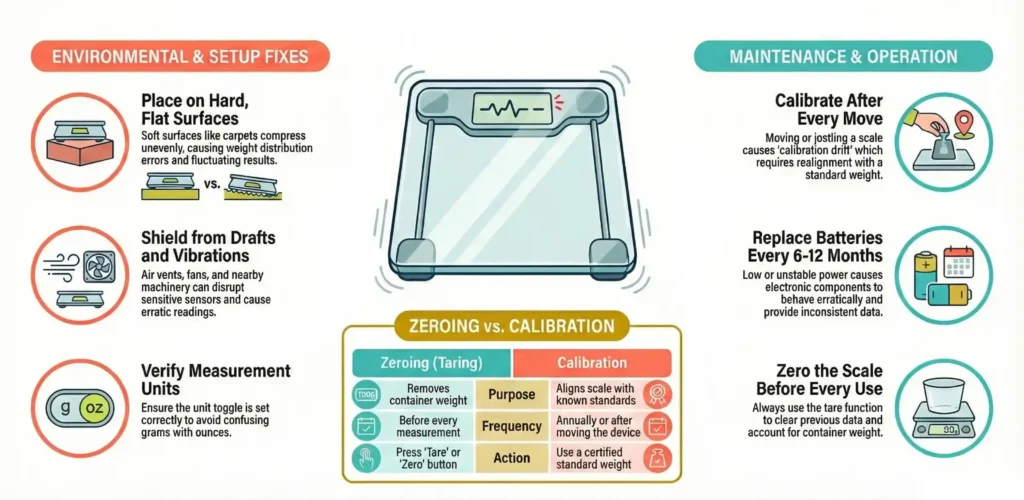
Soft/Uneven Surface
Placing a scale on a soft or uneven surface is one of the most common issues users face. It can lead to weight discrepancies because the scale will not sit properly, and the weight may not be evenly distributed.
Fix: Always place the scale on a hard, flat surface such as a wood or tile floor. Avoid placing it on soft surfaces like carpets or rugs, as they can compress unevenly, resulting in inaccurate readings.
Calibration Issues
Scales can lose their calibration over time, especially after being moved or jostled. This is especially true for high-precision scales used in scientific and industrial applications.
Fix: Recalibrate the scale after it’s been moved or whenever it’s showing inconsistent readings. Use a known calibration weight to check if the scale is still accurate. If your scale has an automatic calibration feature, use it according to the manufacturer’s instructions.
Low Battery or Power Issues
Low or unstable battery power is a common culprit for fluctuating digital scale readings. A low battery can cause the scale’s components to behave erratically, leading to inconsistent measurements.Before assuming the scale is broken, try a full power cycle:
- Remove all weight.
- Replace the batteries (even if they seem “fine”).
- Perform a manual scale calibration using a known weight.
Fix: Replace the batteries regularly, ideally every 6-12 months, depending on your scale’s usage. If your scale uses rechargeable batteries, ensure they’re fully charged. If your scale operates on AC power, make sure the power source is stable and uninterrupted.
User Habits
How you use your scale can impact the readings you get. For example, stepping off-center or not weighing the object consistently can lead to inaccurate readings.
Fix: Always weigh items at the same time daily, under similar conditions (such as after using the bathroom or before meals). Stand in the center of the scale and avoid heavy clothing that may alter your weight measurements.
Environmental Interference
Changes in temperature, humidity, or drafts in your environment can lead to unstable scale readings. Dust and debris can also accumulate inside the scale, affecting its functionality.
Fix: Keep your scale in a clean, dry, and stable temperature environment. Ensure it’s not placed near vents, windows, or open areas where environmental factors could interfere with the reading.
Zeroing vs Calibration: What’s the Difference?
Zeroing (Taring)
Zeroing, also known as taring, is the process of setting the scale to zero before placing an item on it. This ensures that the weight you measure is only that of the item, not the container or any previous measurements.
Purpose: Zeroing should be done every time you use the scale, especially before weighing a new object. It removes the weight of any container or previous sample from the reading.
When to Zero: Always press the tare button before weighing new items. This ensures that your reading starts from zero, giving you an accurate weight measurement.
Calibration
Calibration is a process where the scale is adjusted to match a known standard weight. This ensures that the scale provides accurate readings over time.
Purpose: Calibration ensures that the scale is measuring accurately and is aligned with known weight standards, like certified calibration weights.
When to Calibrate: You should calibrate your scale at least once a year, or whenever you move it, as well as after any significant impact or change in temperature. Some scales may also require calibration if they display inaccurate readings after several uses.
At Scales4U, we provide the expertise and hardware needed to keep your operations precise.
Troubleshooting: Resetting and Re-Taring Your Scale
When your digital scale starts to show inconsistent readings, sometimes all it needs is a reset or a re-taring. These quick fixes are often overlooked but can help restore the scale’s accuracy in no time.
Simple Reset Methods
One of the first steps you can take when dealing with inconsistent readings is to reset your digital scale. This can be especially helpful if the scale is stuck, displaying errors, or giving fluctuating readings.
Steps to reset your scale:
- Replace the Batteries: Start by replacing the batteries. If your scale is battery-operated, a weak or low battery can affect its accuracy.
- Press the Tare/Zero Button: After replacing the batteries, press the tare or zero button. This will reset the scale to zero, ensuring the next item you weigh starts from a clean slate.
- Power Cycle: Remove the batteries for about 60 seconds, then put them back in and power the scale on again. This can help clear any internal issues and recalibrate the scale to its default settings.
If you’re still encountering issues after a reset, it may be time to move on to other fixes or seek professional help.
Load Cell Sensitivity
A critical component of digital scales is the load cell. Load cells are sensors embedded in the feet of the scale that detect the weight being applied. These sensors can be sensitive, and uneven weight distribution can cause fluctuating readings. For high-traffic businesses, regular Maintenance and repair are essential to ensure these sensors haven’t been damaged by shock loading (dropping heavy weights onto the platform).
Cause of issues: If the weight placed on the scale is uneven, it can throw off the sensor’s readings, causing incorrect weight measurements.
Fix: Ensure that the object is placed in the center of the scale, and the weight is evenly distributed. This is particularly important for scales used in industrial or commercial settings, where precise measurements are essential. If your scale is used for weighing large or irregularly shaped objects, consider upgrading to a scale with better load cell sensitivity.
Preventing Future Scale Issues
Now that you’ve identified and fixed the immediate issues causing your scale’s inconsistencies, it’s essential to implement practices that prevent these problems from happening in the future. Proper maintenance and care can significantly extend the life of your scale and help maintain its accuracy.
Regular Calibration and Maintenance
A key factor in ensuring consistent readings is performing regular calibration and maintenance on your digital scale. Neglecting this can result in gradual inaccuracies, especially in precision tasks such as weighing ingredients in a laboratory or materials in a factory setting.
Calibration: You should calibrate your scale at least once a year or more frequently if it’s being moved around, or if it’s subjected to heavy use. Calibration helps ensure that your scale remains aligned with known weight standards, keeping the readings precise.
Maintenance: Regularly check for any debris or grime buildup on the scale’s platform or sensors. Dust and dirt can interfere with the load cells, leading to inaccurate readings. Wipe your scale with a dry cloth after each use, and store it properly in a dry, clean place.
Choosing the Right Scale for the Job
Consistency often comes down to using the right tool for the job. A scale designed for a kitchen will fail in a factory, and a warehouse scale will lack the precision needed for a pharmacy. Knowing which weighing scale type suits your business ensures you aren’t pushing your equipment beyond its intended sensitivity limits.
Consider the following when choosing a scale:
- Capacity: Ensure the scale can handle the weight of the items you plan to weigh. For instance, a small kitchen scale might not be suitable for large industrial loads.
- Precision: Choose a scale with the right level of precision. Overly precise scales may be more sensitive to environmental factors, leading to fluctuating readings, while less precise scales may miss small variations in weight.
- Environment: If you work in a harsh environment with dust, moisture, or chemicals, invest in a scale that is designed to withstand such conditions.
Selecting the right scale will not only improve accuracy but also extend the life of your equipment.
Creating a Stable Environment for Your Scale
Digital scales are sensitive to their environment. To prevent future problems, it’s important to store your scale and use it in the right conditions.
Key tips for creating a stable environment for your scale:
- Temperature: Keep the scale in a room temperature environment, avoiding places with extreme heat or cold. Temperature fluctuations can cause the scale to read inconsistently.
- Humidity: Moisture in the air can damage the internal components of the scale. Avoid placing your scale near sources of humidity, such as bathrooms or kitchens.
- Vibrations: As mentioned earlier, vibrations can disrupt the scale’s readings. Place the scale on a stable, vibration-free surface, and use anti-vibration mats if necessary in industrial or warehouse environments.
By taking these simple steps, you can greatly reduce the chances of future scale issues, ensuring that it continues to provide accurate readings for years to come.
Final Thought
Inconsistent readings from a digital scale can be frustrating, but by understanding the common causes and applying the appropriate fixes, you can maintain your scale’s accuracy and reliability. Whether it’s a mismatch of units, surface instability, environmental factors, or calibration issues, there are clear solutions to get your scale back in proper working order.
Regular maintenance, proper calibration, and using the right scale for the job are key to preventing future problems. And if you’re ever in doubt or need expert help, Scales4U offers professional calibration, repair services, and a wide range of high-quality digital scales for all types of needs across South Africa.
Contact us today to ensure your scale is performing at its best, or explore our range of reliable scales suitable for various applications. Don’t let inaccurate readings affect your business or daily life, trust Scales4U to keep things running smoothly.